Skills matrix examples
Now that you know the benefits of creating a skills matrix, you might still be wondering what that looks like. We’ve added knowledge, skills, and competencies examples below to help you grasp what a matrix does for you outside of the abstract.
For each skill that an employee in a given role should possess, you can rate their aptitude ranging from “beginner” to “expert.” You can rate from 1-5, 1-10, or use words like beginner, advanced, competent, expert, and trainer.
The important thing is to set clear standards for each of your ratings and consistently apply them across every job role and skill set. Having a visual representation of each employee’s skill level will help you place and promote individuals more efficiently. It also allows you to apply the specific online training program you need to address any skills gaps you might find.
1. Skills matrix for sales reps
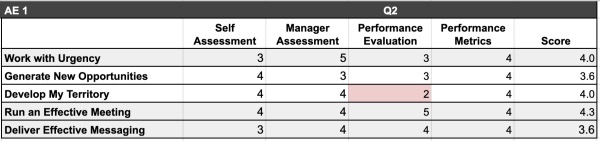
Sales isn’t as straightforward as it can sound. It requires a variety of hard and soft skills that contribute to the overall success of each rep. Creating a sales skills matrix will help you determine which skill contributes the most to productivity, and help you raise the proficiency of anyone who seems to be lagging. For sales reps, your skills matrix might include:
- Email sales: Written communication and reading comprehension.
- Phone sales: Verbal communication, empathy, ability to listen.
- Follow-up: Knowing the ideal interval before next contact, ice-breaking, being personable.
- Cold-calling: Being personable, low-pressure tactics, rapport building.
- Referrals: Networking, group-building, reciprocation.
- Value proposition: Communicating the benefits of the product to potential customers.
- Active listening: Understanding the customer’s pain point, acknowledging needs.
- Problem-solving: Finding unique solutions, innovative thinking, finding a way to please the customer, adjusting to a more digitally-driven sales climate.
Your matrix might rate each employee on general mastery of an overall skill, broken down into component strengths to assess which skills add most to productivity. Is your one amazing cold-call rep weak on timing but extremely personable? How much better would their productivity be if they could increase “ideal interval” skills as well?
2. Leadership skills matrix
A leadership skills matrix may look different according to the specific needs of your organization. You may need someone with specialized skills to lead a particular team or organize certain projects, but base-level leadership skills should look the same across your company. The skills are vital to managing both people and tasks:
- Project management: Prioritizing, estimation, delegation.
- Time management: Arranging by deadline, accurate completion estimates, flexibility.
- Negotiation: Adjusting schedules, getting more help, making your case, extending deadlines.
- Task assignment: Giving tasks to qualified personnel, snap decisions, evaluation of progress.
- Employee management: Understanding who is best for a job, impartial judgment, reciprocated loyalty.
As you assess each of your employees for leadership skills, it’s important to nurture areas of strength and address places of weakness. Sometimes, those who are successful in a role compensate for weak skill sets by being highly proficient in another. This can work in the short term but lead to breakdown once you require more from the person filling the role. Periodic assessment and ongoing training can help address these inequalities to give you a more well-balanced skills pool.
3. IT skills matrix
Again, depending on your particular needs, the skillset of your ideal IT candidate may vary. However, there are certain core skills you’ll want every IT employee to possess. You can customize any of the examples below to fit the unique requirements of your business.
You may have your own list of skills that you want your IT staff to possess, but common ones include Python, Javascript, Six Sigma, Microsoft Office Suite, hardware networking and repair, and customer service. Each of these skills might be necessary to troubleshoot your e-commerce store, assist customers with account problems, fix your internal network, and other vital roles within your organization.
How to create a skills matrix
So, now you know what a skills matrix is and what it should look like. But how do you get started when trying to build one?
It’s best to start with a pre-existing template to save yourself time and trouble. A basic training matrix template will help you arrange a list of skills into a chart. You need room for the employees that you’re rating, their skills, and their rating on each. Then, assign lessons based on the areas that need addressing and update each employee’s competency rating as they begin to improve. If you are evaluating productivity before and after assigning ongoing training, mark that down, as well.
You can also create a skills matrix template that organizes by the skills required for each position to see how your employees stack up to their job roles. A good skills management software will let you change views with a few clicks, so you can evaluate either by position or by the employee. This will help you see the big picture and focus on improvement rather than perfection.
Looking at the technical skills and competencies of your employees will allow you to make better hiring and promotion decisions. Instead of hiring by general skillset or perceived competency, you’ll know exactly what you need to balance out each team. You can also identify opportunities to train up someone who already works for you to fill a new role or take on added responsibility.


